Convert colors to dialogue converts color-based speaker indication (commonly used in SDH subtitles) into standard dialogue formatting using hyphens.
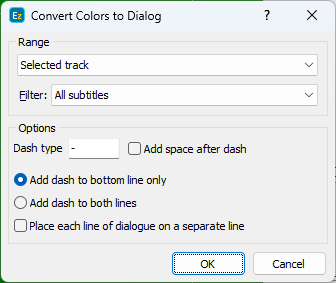
Range |
For projects with more tracks, you can run Convert colors to dialogue on the selected (Default), Main or Secondary tracks, or both Main & Secondary tracks. |
Filter |
Select Subtitles Range, the default is All Subtitles. |
Dash Type |
Select character that marks dialogue (the default is - ). |
Add space after dash |
Adds a space after the dash for readability (for example - Hello instead of -Hello). |
Add dash to bottom line only |
Adds a dash only to the second line in a two-line subtitle. |
Add dash to both lines |
Adds a dash to both lines, which works well when each line represents a different speaker. |
Place each line of dialogue on a separate line |
Makes sure each speaker appears on their own line. |