The Imsc-Rosetta Timed Text export is developed to tightly follow the Imsc-Rosetta specifications. The following export options are available:
Force Font Settings |
This option allows you to overwrite the Font Size and LineHeight parameters from your current Project Settings with the exact values specified in the delivery requirements. In this case, values specified in "rh" can be treated as equivalent to the same numerical values in "%". |
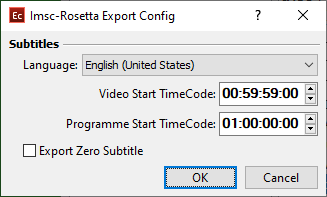
Language |
Allows you select the language for the output file. In the Command Line, Config Editor, Watch Folder tools there's an additional <from_source> parameter to automatically detect the language of the input file and pass it to the output. |
No Region |
The language identifier tag consists of two parts Language ID + Country ID. For example, if we select "English (United States)" from the drop-down, the corresponding language tag will be: xml:lang="en-US". |
Video Start TimeCode |
Video's Start Timecode will be saved in the metadata of the output .imscr file. Will be filled by automatically when the input format is EZT and EZTXML. |
Programme Start TimeCode |
Programme's start timecode will be saved in the metadata of the output .imscr file. Will be filled automatically if Programme Start TC is available in the input EBU STL, EBU-TT, EZT or EZTXML file. |
Export Zero Subtitle |
Zero Subtitle, if available in your project, will be exported in the output .imscr file. |
Imsc-Rosetta supports wide array of features, styling options and effects applicable to Open and SDH Subtitles, Closed Captions and Japanese subtitling. The later include horizontal groups, ruby and bouten/emphasis annotations and vertically oriented subtitles. Full documentation of the supported features is available on their GitHub page.